



Monochrome screen a (with audio equipment)
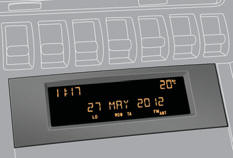
Displays in the screen
This displays the following information:
- time,
- date,
- ambient temperature * (this fl ashes if there is a risk of ice),
- status of the openings (doors, boot, ...),
- audio sources (radio, CD, ...),
- trip computer (refer to the corresponding section).
Warning messages (e.g.: "Emission control system faulty") or information messages (e.g.: "Boot open") may appear temporarily. Some can be cleared by pressing the " < ] arrow" button.
Controls
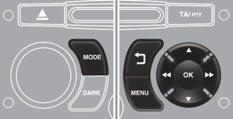
From the audio equipment control panel, you can:
press the "MENU" button to gain access to the main menu , press the
 buttons to scroll through the items
on the screen, press the "MODE" button to change the permanent application (trip
computer, audio source, ...), press the
buttons to scroll through the items
on the screen, press the "MODE" button to change the permanent application (trip
computer, audio source, ...), press the
 buttons to change a setting value,
press the "OK" button to confirm,
buttons to change a setting value,
press the "OK" button to confirm,
or

press this button to abandon the operation in progress.
Main menu
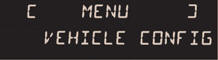
Press the "MENU" button for access to the main menu , then press the
 buttons to scroll through the various
menus:
buttons to scroll through the various
menus:
- radio-CD,
- vehicle configuration,
- options,
- display settings,
- languages,
- units.
Press the "OK" button to select the menu required.
Radio-CD
With the audio equipment switched on, once the "Radio-CD" menu has been selected you can activate or deactivate the functions linked with use of the radio (RDS, REG), the CD or the CD changer (introscan, shuffle, CD repeat).
 For more information on the "Radio-CD" application, refer to the "Audio
equipment and telematics" section.
For more information on the "Radio-CD" application, refer to the "Audio
equipment and telematics" section.
Vehicle configuration
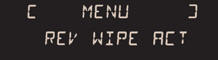
Once the "Vehicle configuration" menu has been selected, you can activate or deactivate the following equipment (according to country):
- wiper linked with reverse gear (refer to the "Visibility" section),
- selective unlocking (refer to the "Access" section),
- guide-me-home and welcome lighting (refer to the "Visibility" section),
- interior mood lighting (refer to the "Visibility" section),
- daytime running lamps (refer to the "Visibility" section),
- directional headlamps (refer to the "Visibility" section),
- automatic or manual parking brake (refer to the "Driving" section),
Options
Once the "Options" menu has been selected, you can start diagnostics of the status of the equipment (active, not active, faulty).
Display settings
Once the "Display settings" menu has been selected, you can gain access to the following settings:
- year,
- month,
- day,
- hour,
- minutes,
- 12 or 24 hour mode.
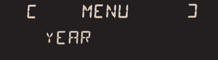
Once you have selected a setting, press the
 buttons to change its value.
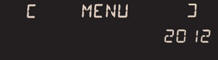
Press the  buttons to switch respectively
to the previous or next setting.
buttons to switch respectively
to the previous or next setting.
Press the "OK" button to record the change and return to the normal display or press the " < ] arrow" button to cancel.
Languages
Once the "Languages" menu has been selected, you can change the language used by the display.
Units
Once the "Units" menu has been selected, you can change the units of the following parameters:
- temperature (°C or °F),
- fuel consumption (l/100 km, mpg or km/l).
For safety reasons, configuration of the multifunction screen by the driver
must only be done when stationary.
See also:
Direction indicators
Lower the lighting control stalk fully when moving to the left.
Raise the lighting control stalk fully when moving to the right.
If you forget to cancel the direction indicators for more than tw ...
6-Speed electronic gear control gearbox
Six-speed electronic gear control gearbox which offers a choice between the comfort
of automated operation or the pleasure of manual gear changing.
Two driving modes are offered:
- automated mode ...
Definitions
Anti-lock braking system (ABS) and electronic brake force distribution (EBFD)
This system improves the stability and manoeuvrability of your vehicle when braking
and provides improved control in co ...