



Rear multimedia
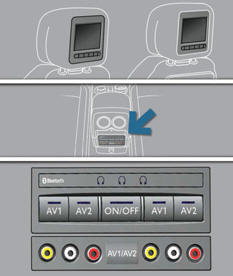
Multimedia system permitting the connection of any external portable system: iPod Video, games consoles, DVD player, …
 Two separate video sources can be
connected via the RCA connectors (yellow).
Two separate video sources can be
connected via the RCA connectors (yellow).
 The video is displayed in two 7"
screens, integrated in the head restraints.
The video is displayed in two 7"
screens, integrated in the head restraints.
 Two separate audio sources can be
connected via the RCA connectors (red and white).
Two separate audio sources can be
connected via the RCA connectors (red and white).
 The audio is heard through two wireless
headphones with Bluetooth technology which operate with rechargeable batteries.
The audio is heard through two wireless
headphones with Bluetooth technology which operate with rechargeable batteries.
The A/B button allows you to pair the headphones with the screen: A lefthand side, B right-hand side.
You have a 12 V charger with two outputs permitting simultaneous charging of both headphones.
It is also possible to connect a 3rd set of Bluetooth headphones.
Set-up
With the engine running, connect your portable system to the RCA connectors (e.g. with AV1 on the left).
Press the system's ON/OFF button, the indicator lamp comes on and the AV1 indicator lamps come on.
Press and hold the ON/OFF button on the headphones, the indicator lamp on the headphones fl ashes in blue.
Press and hold the system's ON/OFF button, the pairing with the headphones is complete when the blue indicator lamps on the headphones and on the system (in the shape of headphones) are on continuously.
Press the ON/OFF buttons in the screens if you have a video source.
Start playing your portable system.
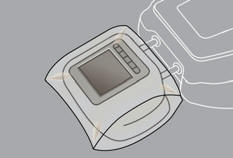
 If your seat is in the table position, position a cover to avoid damaging
the screen.
If your seat is in the table position, position a cover to avoid damaging
the screen.
These covers also conceal each screen.
See also:
Cabin oddities
Peugeot’s clearly taking this modern technology theme seriously, because this
is the first car we’ve tested without a CD player. Instead you get two USB
ports. They connected phones and devices up ...
Front seat belts
The front seat belts are fitted with a pretensioning and force limiting system.
This system improves safety in the front seats in the event of a front or side impact.
Depending on the severity o ...
Road-holding: the Marque's expertise
The Peugeot Marque has demonstrated the full extent of its expertise in
developing a new combination, at a very high level as regards the road-holding
of its Peugeot 208, in order to carry forward ...