



USB port / Jack auxiliary socket
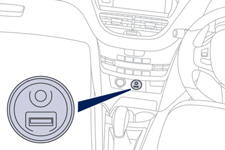
This connection box, consisting of a JACK auxiliary socket and a USB port, is located on the centre console.
It allows the connection of portable device, such as a digital audio player of the iPod ® type or a USB memory stick.
It reads the audio file formats (MP3, OGG, WMA, WAV, ...) which are transmitted to your audio system and played via the vehicle's speakers.
You can manage these files using the steering mounted controls or the audio system control panel and display them in the instrument panel screen.
When the USB port is used, the portable device charges automatically.
For more information on the use of this system, refer to the "Audio and Telematics" section.
See also:
Accessories
A wide range of accessories and genuine parts is available from the PEUGEOT dealer
network. These accessories and parts have been tested and approved for reliability
and safety. They are all adapt ...
Peugeot 208 Review
Peugeot's numbering system means you always know where you are in its pecking
order: 107, 208, 308, 508, 3008, 4007, 5008… The higher the number the bigger
the car. But there are two inexplicable ...
Then one day someone has an idea.
What if, to make manoeuvring easier and increase driving sensations, the
diameter of the steering wheel were reduced? And what if, to make it easier to
read the information on the instrument panel ...