



Programming
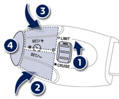
Turn thumb wheel 1 to the "LIMIT" position: the speed limiter mode is selected but is not switched on (PAUSE).
You do not have to switch the speed limiter on in order to set the speed.
Set the speed value by pressing button 2 or 3 (e.g.: 55 mph (90 km/h)). You can then change the programmed speed using buttons 2 and 3:
- by + or - 1 mph (km/h) = short press,
- by + or - 5 mph (km/h) = long press,
- in steps of + or - 5 mph (km/h) = maintained press.
- Switch the speed limiter on by pressing button 4 .
- Switch the speed limiter off by pressing button 4: the display confirms that it has been switched off (PAUSE).
- Switch the speed limiter back on by pressing button 4 again.
See also:
Interior welcome lighting
The remote switching on of the passenger compartment lighting makes your approach
to the vehicle easier in poor light. It operates with the automatic illumination
of headlamps.
Switching on
Pres ...
Stopping the vehicle
Before switching off the engine, you can choose to:
- move to position N to engage neutral,
- leave the gear engaged; in this case, it will not be possible to move the vehicle.
In both cases, you m ...
1.6 litre e-hdi fa p 112 bhp engine
To deploy this technology on a large scale, the new Peugeot 308 proposes
e-HDi technology with a "basic" engine, the 1.6 litre HDi FAP 112 bhp, which can
be coupled with two gearboxes (m ...