



Instrument panels
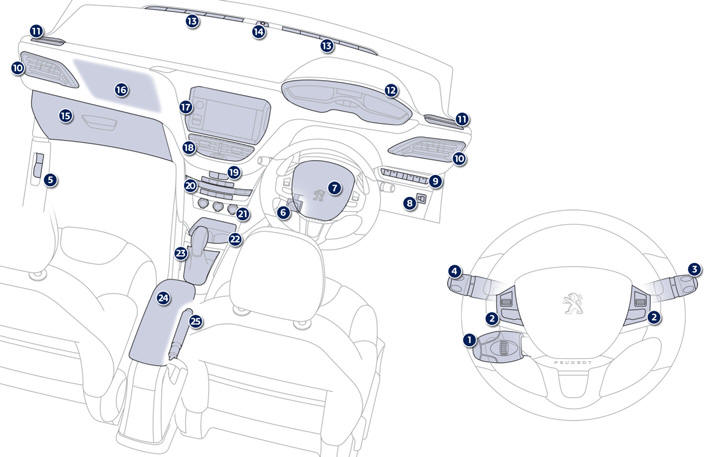
1. Cruise control / speed limiter controls.
2. Steering mounted controls for the touch screen.
3. Wiper / screenwash / trip computer stalk.
4. Lighting and direction indicator stalk
5. Bonnet release lever.
6. Steering wheel adjustment control.
7. Driver's airbag. Horn.
8. Headlamp height adjustment.
9. Switch panel.
19. Central locking and hazard warning buttons.
20. Heating / air conditioning controls.
21. 12 V accessory socket. USB port / auxiliary socket. Additional USB port.
22. Open storage. Cup holder.
23. Gear lever.
24. Central armrest with storage.
25. Parking brake.
See also:
Instrument panel type 1
Dials
1. Rev counter.
Indicates the speed of rotation of the engine (x 1000 rpm).
2. Coolant temperature.
Indicates the temperature of the engine coolant (° Celsius).
3. Fuel level.
Indicates ...
Renewed sensations, thanks to an innovative design and equipment
The 208 also succeeds in renewing the driving pleasure of its driver through
these new instruments and controls. With its small steering wheel, but also its
instrument panel placed in a high posit ...
Hazard warning lamps
A visual warning by means of the direction indicators to alert other road users
to a vehicle breakdown, towing or accident.
Press this button, the direction indicators flash.
They can operate wi ...