



Information display
 Press MODE located on
the touch screen front panel, to display the various tabs.
Press MODE located on
the touch screen front panel, to display the various tabs.
Select the desired tab using your finger.
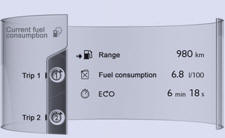
 The current information
tab with:
The current information
tab with:
● the range,
● the current fuel consumption,
● the Stop & Start time counter.

The trip "1" tab with:
● the distance travelled.
● the average fuel consumption,
● the average speed, for the first trip.
 The trip "2" tab with:
● the distance travelled.
● the average fuel consumption,
● the average speed, for the second trip.
See also:
Petrol engines
The various caps and covers allow access for checking the levels of the various
fluids and for replacing certain components.
1. Power steering reservoir.
2. Screenwash and headlamp wash reserv ...
Main lighting
The vehicle has various lamps:
- sidelamps, to be seen,
- dipped beam headlamps to see without dazzling other drivers,
- main beam headlamps to see clearly when the road is clear,
- directional he ...
A few definitions
Range (miles or km)
This indicates the distance which can still be travelled with the fuel remaining
in the tank in relation to the average fuel consumption over the last few miles
(kilometres) ...