



Peugeot connect USB
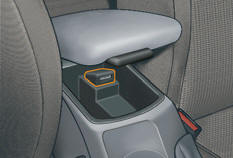
This connection box, consisting of a USB port, is located in the front armrest.
It permits the connection of portable equipment, such as an iPod ® digital audio player of generation 5 or later or a USB stick.
It reads the audio fi le formats (mp3, ogg, wma, wav...) which are transmitted to your audio equipment and played via the vehicle's speakers.
You can manage these fi les using the steering wheel controls or the audio equipment control panel and display them on the multifunction screen.
When it is in use, the portable equipment charges automatically.
For more information on the use of this equipment, refer to the "Audio and Telematics" section.
See also:
Front airbags
System which protects the driver and front passenger in the event of a serious
front impact in order to limit the risk of injury to the head and thorax.
The driver's airbag is fitted in the c ...
Cornering lighting
With dipped or main beams, this function makes use of the beam from a front foglamp
to illuminate the inside of a bend, when the vehicle speed is below 25 mph (approximately
40 km/h) (urban driv ...
Description of the kit
A. "Sealant" or "Air" position selector.
B. On "I" / off "O" switch.
C. Deflation button.
D. Pressure gauge (in bar or p.s.i.).
E. Compartment housing:
- ...