



Starting the engine
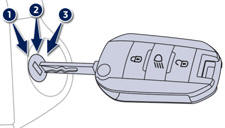
Insert the key in the ignition switch. The system recognises the starting code.
Turn the key fully towards the dashboard to position 3 (Starting).
When the engine starts, release the key.
See also:
Mats
Removable carpet protection.
Fitting
When fitting the mat for the first time, on the driver's side use only the
fixings provided in the wallet attached.
The other mats are simply placed on th ...
Panoramic sunroof
Component which has a tinted glass panoramic surface to increase the light and
visibility in the passenger compartment.
Fitted with an electric blind in several sections to improve temperature and ...
Towing the vehicle
Procedure for having your vehicle towed or for towing another vehicle using a
removable towing eye.
Access to the tools
The towing eye is installed in the boot under the floor.
To gain access t ...