



Display in the instrumental panel
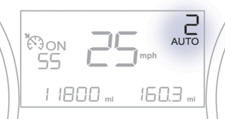
Gear lever positions
N . Neutral
R . Reverse
1, 2, 3, 4, 5. Gears in sequential mode
AUTO. This comes on when the automated mode is selected. It switches off on changing to sequential mode.
In the automated mode, if the gearbox detects poor grip, this warning lamp comes on.
 Place your foot on the
brake when this warning lamp flashes (e.g.: starting the engine).
Place your foot on the
brake when this warning lamp flashes (e.g.: starting the engine).
There is an audible signal on engagement of reverse.
See also:
Interior mood lighting
The dimmed passenger compartment lighting improves visibility in the vehicle
when the light is poor.
Switching on
At night, the footwell lighting and the front courtesy mood lamp come on automat ...
Oil level
The check is carried out either when the ignition is switched on using the oil
level indicator on the instrument panel, or using the dipstick.
This manual check will only be correct if the vehicl ...
Mirrors
Door mirrors
Each fitted with an adjustable mirror glass permitting the lateral rearward vision
necessary for overtaking or parking.
They can also be folded for parking in confined spaces.
Demi ...