



Manual gear changing
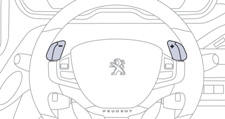
This selective gear change mode enables you to overtake, for example, while still remaining in automatic mode.
Operate the + or - steering mounted control paddle.
The gearbox engages the gear requested if the engine speed permits. AUTO is still displayed in the instrument panel.
After a few moments without any action on the controls, the gearbox resumes automatic control of the gears.
See also:
Front lamps
A. Model with light guide
1. Main beam headlamps (H7-55W).
2. Dipped beam headlamps (H7-55W).
3. Daytime running lamps / sidelamps (light emitting diodes - LEDs).
4. Direction indicators (PWY-24 ...
Folding the backrest
Move the front seats forward if necessary.
Position the seat belts on the backrest and buckle them.
Place the head restraints in the low position.
Press both controls 1 simultaneously ...
Unlocking the vehicle Complete unlocking
Using the key
Turn the key to the front of the vehicle to unlock the vehicle.
Using the remote control
Press the open padlock
to unlock the vehicle.
Unlocking is confirmed by rapid flashing of ...