



Displays in the instrument panel
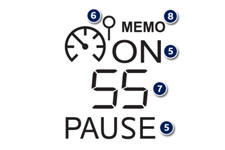
The programmed information is grouped together in the instrument panel screen.
5. Speed limiter on / off indication.
6. Speed limiter mode selection indication.
7. Programmed speed value.
8. Selection of a memorised speed setting. (see "Memorising speeds")
See also:
Dimensions (in mm)
308 saloon
308 SW
...
Advice on child seats
The incorrect installation of a child seat in a vehicle compromises the child's
protection in the event of an accident.
Remember to fasten the seat belts or the child seat harnesses keeping the ...
Locking the vehicle
Normal locking using the remote control
Press the closed padlock to lock the vehicle completely.
Press the closed padlock for more than two seconds to close the windows automatically
in addition ...