



Rear view mirror
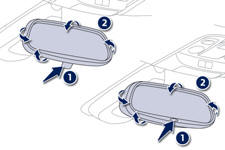
Manual day/night type
1. Selecting the "day" position of the rear view mirror.
2. Rear view mirror adjustment.
Automatic day/night type
1. Automatic detection of day/night mode.
2. Rear view mirror adjustment.
See also:
Fitting roof bars (308 SW with bench rear seat, 308 SW with individual rear
seats)
When fitting transverse roof bars, ensure that they are positioned correctly
as shown by marks under the longitudinal roof bars.
Use accessories recommended by PEUGEOT and follow the accessory ...
Safety anti-pinch
When the window rises and meets an obstacle, it stops and immediately partially
lowers again. In the event of unwanted opening of the window when closing automatically,
press the switch until the ...
Toll card / car park ticket windows
Facility for affixing toll cards and/or car park tickets.
These windows are located on each side of the base of the rear view mirror.
They are two non-reflective areas of the athermic windscreen.
...