



Trip reset
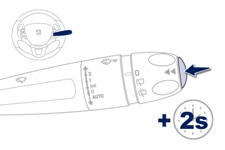
When the trip required is displayed, press the control for more than two seconds or use the left hand thumb wheel of the steering mounted controls.
Trips "1" and "2" are independent but their use is identical.
For example, trip "1" can be used for daily figures, and trip "2" for monthly figures.
See also:
Moving off
Select position N.
Press the brake pedal down fully.
Start the engine.
N appears in the instrument panel
screen.
N flashes in the instrument panel, accompanied by an audible signal and a ...
Driving safely
Stop & Start
Going into engine STOP mode
The "ECO" warning lamp comes on
in the instrument panel and the engine automatically goes into standby:
- with a manual gearbox: at speeds ...
Storage drawer
The storage drawer is located under the front passenger's seat.
Opening
Raise the front of the drawer and pull it.
Removal
Bring the drawer to the end of its travel.
Press the ends of the s ...