



Locking / unlocking from the inside
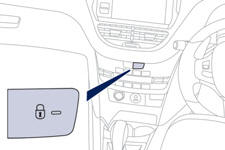
Press the switch.
This allows the doors and the boot to be locked or unlocked.
If one of the doors is open, the doors are not locked.
When locking / deadlocking from outside
When the vehicle is locked or deadlocked from outside, the switch does not operate.
- After normal locking, pull the interior door lever to unlock the vehicle.
- After deadlocking, you have to use the remote control or the key to unlock the vehicle.
Automatic central locking of the doors
The doors can lock automatically while driving (speed above 6 mph [10 km/h]).
To turn this function on or off (on by default).
press and hold the button until there is an audible signal and/or a message in the screen.
Driving with the doors locked may make access to the passenger compartment by the emergency services more difficult in an emergency.
See also:
General recommendations
Observe the legislation in force in your country. Ensure that the weight of the
towing vehicle is higher than that of the towed vehicle. The driver must stay at
the wheel of the towed vehicle. Dri ...
Alarm
System which protects and provides a deterrent against the theft of your vehicle.
It provides two types of protection, exterior and interior, as well as an antitamper
function.
Exterior perimiter ...
Peugeot 308 Review
2012 Peugeot 308 Active Hatch Petrol: 1.6-litre direct-injection turbo with
six-speed auto transmission, 115kW/240Nm. $31,490 (Manufacturer’s List Price)
Any idea how many 308s Peugeot sold up to ...