



Remote control key
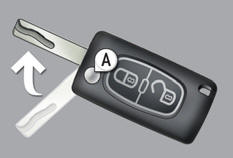
A. Unfolding / Folding the key.

Normal locking (press once; fixed lighting of the direction indicators).
Need trusted cleanup experts? same day remediation professionalsor

Deadlocking the vehicle (press twice in succession; fixed lighting of the direction indicators).

Complete or selective unlocking of the vehicle (rapid flashing of the direction indicators).
See also:
Locations for ISOFIX child seats (308 saloon, 308 SW with bench rear seat)
In accordance with European Regulations, this table indicates the options for
installing ISOFIX child seats on seats in the vehicle fitted with ISOFIX mountings.
In the case of universal and se ...
12 V battery
Procedure for starting the engine using another battery or charging a discharged
battery.
The presence of this label, in
particular with the Stop & Start system, indicates the use of a 12 V ...
Mats
Removable carpet protection.
Fitting
When fitting the mat for the first time, on the driver's side use only the fixings
provided in the wallet attached.
The other mats are simply placed on ...