



Head-up display
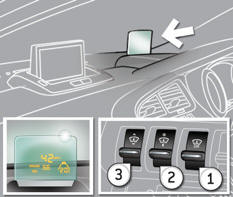
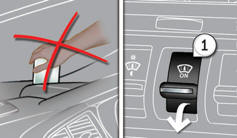
1. Head-up display on / off.
2. Brightness adjustment.
3. Display height adjustment.
See also:
Wiper controls
System for selection and control of the various front and rear wiping modes for
the elimination of rain and cleaning.
The vehicle's front and rear wipers are designed to improve the driver' ...
Starting the vehicle
Insert the key in the ignition switch.
The system recognises the starting code.
Turn the key fully towards the dashboard to position 3 (Starting) .
When the engine starts, release the key.
...
Speed limiter
System which prevents the vehicle from exceeding the speed programmed by the
driver.
When the programmed speed limit is reached, pressing the accelerator pedal no
longer has any effect.
The spee ...