



Lighting dimmer
System for manual adjustment of the brightness of the instrument panel in relation to the exterior brightness.
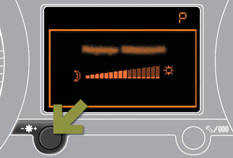
Activation
When the vehicle lighting is on: press the button to change the brightness of the instrument panel, when the lighting reaches the minimum setting, release the button, then press again to increase it,
or
when the lighting reaches the maximum setting, release the button, then press again to reduce it, when the lighting reaches the level of brightness required, release the button.
 When the vehicle lighting is on, you cannot switch the instrument panel
lighting off but you can adjust it to minimum.
When the vehicle lighting is on, you cannot switch the instrument panel
lighting off but you can adjust it to minimum.
Deactivation
When the lighting is off, or in day mode on vehicles fitted with daytime running lamps, pressing the button does not have any effect.
See also:
Brake pads
Brake wear depends on the style of driving, particularly in the case of vehicles
used in town, over short distances. It may be necessary to have the condition of
the brakes checked, even between ...
Electric parking brake
Manual application / release
The parking brake can be applied manually by pulling the control lever A .
When the ignition is on, the parking brake can be released manually by pressing
the brake ...
Emergency or assistance call
This system allows you to make an emergency or assistance call to the emergency
services or to the dedicated PEUGEOT service.
For more information on the use of this function, refer to the " ...