



16/9 retractable colour screen (with peugeot connect navigation (Rt6) or Peugeot connect media navigation (Ng4 3d)
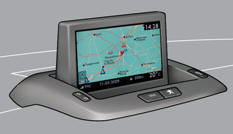
Displays in the screen
When the screen is unfolded, it displays the following information automatically and directly:
- time,
- date,
- altitude,
- ambient temperature (the value displayed fl ashes if there is a risk of ice),
- doors check,
- warning and vehicle function status messages, displayed temporarily,
- audio functions,
- trip computer information.
- satellite navigation system information.
 Depending on the equipment fitted to your vehicle, the trip computer information
appears in either the multifunction screen or the instrument panel screen.
Depending on the equipment fitted to your vehicle, the trip computer information
appears in either the multifunction screen or the instrument panel screen.
Controls
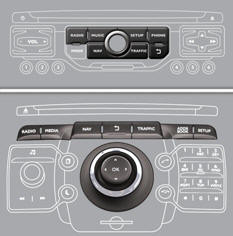
From the audio system control panel:
press the dedicated "RADIO" , "MUSIC", "NAV" , "TRAFFIC" , "SETUP" or "PHONE" button for access to the corresponding menu, turn the navigator to move the selection, press the navigator to confirm the selection,
or

press the this button to abandon the current operation and return to the previous display.
For operation of the retractable screen (opening, closing, adjustment of
the position, etc.), refer to the paragraph "Access to the retractable screen".
"SETUP" menu
Press the "SETUP" button for access to the "SETUP" menu. This allows you to select from the following functions:
- "Languages" (Peugeot Connect Navigation (RT6)),
- "Languages and voice functions" (Peugeot Connect Media Navigation (NG4 3D))
- "Date and time",
- "Display",
- "Vehicle parameters" (Peugeot Connect Navigation (RT6)),
- "Units",
- "System".
Languages (Peugeot Connect Navigation (RT6))
This menu allows you to select the lannsguage used by the display.
Languages and voice functions (Peugeot Connect Media Navigation (NG4 3D))
This menu allows you to:
- select the language used by the disnsplay,
- select the settings for voice recognition (on/off, instructions on use, personal
voice training...),
- adjust the volume of the voice synthesiser.
* According to country.
Date and time
This menu allows you to set the date and time, the format of the date and the format of the time.
Display
This menu allows you to set the brightness of the screen, the screen colour scheme and the colour of the map (day/night or auto mode).
Vehicle parameters (Peugeot Connect Navigation (RT6))
This menu allows you to activate or deactivate certain driving and comfort equipment * :
- wiper linked with reverse gear (refer to the "Visibility" section),
- selective unlocking (refer to the "Access" section),
- guide-me-home and welcome lighting (refer to the "Visibility" section),
- interior mood lighting (refer to the "Visibility" section),
- daytime running lamps (refer to the "Visibility" section),
- directional headlamps (refer to the "Visibility" section),
- automatic or manual parking brake (refer to the "Driving" section),
Units
This menu allows you to select the units: temperature (°C or °F) and fuel consumption (km/l, l/100 or mpg).
System
This menu allows you to restore the factory configuration, display the software version and activate scrolling text.
 For safety reasons, configuration of the multifunction screen by the driver
must only be done when stationary.
For safety reasons, configuration of the multifunction screen by the driver
must only be done when stationary.
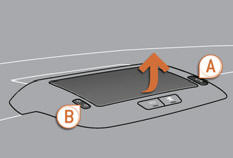
Access to the retractable screen
This screen is opened and stored automatically.
However, you can also open it, store it and adjust it using the various manual controls:
- opening or storing by means of control A ,
- angle adjustments by means of control B .
It is also fitted with safety auto-reverse protection.
Opening the screen
With the screen stored, press control A to open it.
The screen opens automatically when the ignition is switched on, when the audio and telematics system is switched on, when an outgoing telephone call is made, when a voice command is given and when a warning message linked with the STOP warning lamp is received.
If you close the screen during operation of the audio and telematics system,
it will reopen automatically when an outgoing telephone call is made, when a voice
command is given or when a warning message linked with the STOP warning lamp is
received.
Closing the screen
With the screen open, press control A to store it.
The screen is stored automatically when the ignition is switched off, after approximately three seconds, if the audio and telematics system is off.
Safety auto-reverse
If the screen meets an obstacle as it opens or closes, the movement stops immediately and is reversed by a few millimetres.
After clearing the obstacle, issue the command required again.
If you wish the screen to open or close automatically when the audio and
telematics system is switched on or off, the screen must not be closed when the
audio and telematics system is operating.
Adjusting the position of the screen
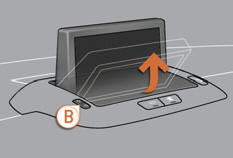
When the screen is open, you can adjust it precisely in different ways:
press the corresponding part of control B to move the screen towards you or towards the windscreen,
or
push or pull the screen gently by hand.
Storing the position of the screen
The system has four pre-set positions in its memory.
Each time the screen is closed, the system stores the last position of the screen.
Each time the screen is re-opened, the system returns the screen to the pre-set position closest to that stored.
See also:
Distance recorders
The total and trip distances are displayed for thirty seconds when the ignition
is switched off, when the driver's door is opened and when the vehicle is locked
or unlocked.
Total distanc ...
Operating fault
In the event of a malfunction
of the system, when reverse gear is engaged this warning lamp is displayed in the
instrument panel and/or a message appears in the screen, accompanied by an audible ...
Brake fluid level
The brake fluid level should be close to the "MAX" mark. If it is not, check
the brake pad wear.
Changing the fluid
Refer to the servicing booklet for details of the interval for this ...