



Gear lever
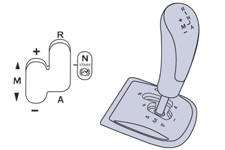
R. Reverse
With your foot on the brake, move the lever forwards to select this position.
N. Neutral.
With your foot on the brake, select this position to start the engine.
A . Automated mode.
Move the lever backwards to select this mode.
M. + / - Sequential mode with manual gear changing.
Move the lever backwards, then to the left to select this mode, then:
- push forwards to change up a gear,
- or push backwards to change down a gear.
See also:
Toll card / car park ticket windows
Facility for affixing toll cards and/or car park tickets.
These windows are located on each side of the base of the rear view mirror.
They are two non-reflective areas of the athermic windscreen.
...
Changing a wiper blade
Before removing a front wiper blade
Within one minute after switching off the ignition, operate the wiper stalk to
position the wiper blades vertically on the windscreen.
Removing
Raise the cor ...
Gear shift indicator
System which reduces fuel consumption by advising the driver to change up.
Operation
The system intervenes only when driving economically.
Depending on the driving situation and your vehicle's ...