



Display in the instrumental panel
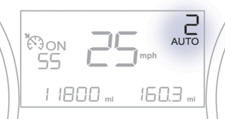
Gear lever positions
N . Neutral
R . Reverse
1, 2, 3, 4, 5. Gears in sequential mode
AUTO. This comes on when the automated mode is selected. It switches off on changing to sequential mode.
In the automated mode, if the gearbox detects poor grip, this warning lamp comes on.
 Place your foot on the
brake when this warning lamp flashes (e.g.: starting the engine).
Place your foot on the
brake when this warning lamp flashes (e.g.: starting the engine).
There is an audible signal on engagement of reverse.
See also:
Battery
Procedure for charging your battery when it is flat or for starting the engine
using another battery.
The presence of this label indicates the use of a 12 V lead-acid battery with
special techn ...
Indicator and warning lamps
Visual indicators informing the driver that a system is in operation, switched
off or has a fault.
When the ignition is switched on
Certain warning lamps come on for a few seconds in the instr ...
Grip control
Normal mode.
Snow mode.
Mud mode.
Sand mode.
ESP OFF. ...