



Displays in the instrument panel
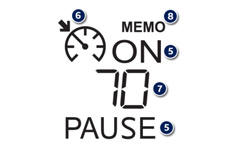
The programmed information is grouped together in the instrument panel screen.
5. Cruise control off/resume indication.
6. Cruise control mode selection indication.
7. Programmed speed value.
8. Selecting a memorised speed setting. (see "Memorising speeds")
See also:
Automated mode
After starting the vehicle, select position A for enter automated mode.
AUTO and the gear engaged appear
in the instrument panel screen.
The gearbox is then operating in auto-active mode, without ...
Accessories
A wide range of accessories and genuine parts is available from the PEUGEOT dealer
network. These accessories and parts have been tested and approved for reliability
and safety. They are all adapt ...
Letting your body drive
Out on the road, you soon become aware that the small steering wheel does
dominate much of the experience. You don’t need to twirl your arms as much. You
feel like a racing driver on B-roads, neve ...