



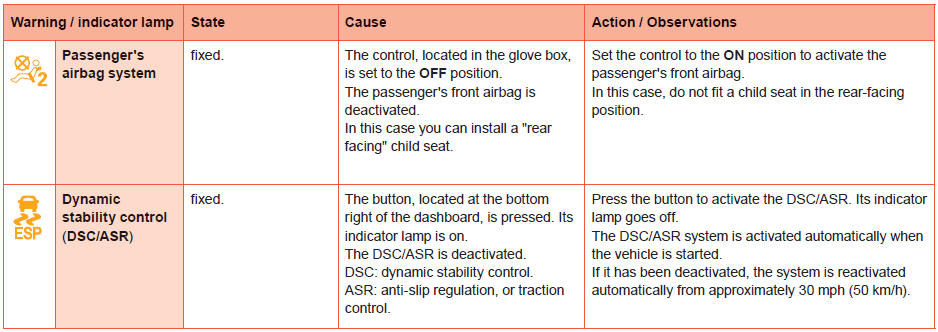
Deactivation indicator lamps
If one of the following indicator lamps comes on, this confirms that the corresponding system has been switched off intentionally. This is may be accompanied by an audible signal and a message in the screen.
See also:
Diesel engines and gearboxes
* The maximum power corresponds to the type approved value on a test bed, under
the conditions defined in European legislation (directive 1999/99/CE). ...
But does it work?
However, we’re of the opinion that different can only be considered truly
good and worthwhile if the experience it brings is better. We spent a week with
the 208 and, for the most part, were genui ...
On-line user guide
You can find your user guide on the PEUGEOT website, under the heading "Personal
space".
This personal space offers advice and other useful information for the care and
maintenance of y ...