



Remote control key
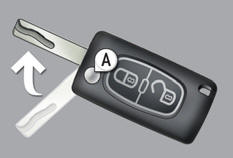
A. Unfolding / Folding the key.

Normal locking (press once; fixed lighting of the direction indicators).
or

Deadlocking the vehicle (press twice in succession; fixed lighting of the direction indicators).

Complete or selective unlocking of the vehicle (rapid flashing of the direction indicators).
See also:
Trajectory control systems
Anti-slip regulation (ASR) and electronic stability programme (ESP)
The anti-slip regulation (also known as Traction Control) optimises traction
to prevent skidding of the wheels, by acting on the ...
Completely re-thought instruments and controls
Sometimes, things are noticed that seem intangible. A hatchback has 4 wheels,
a steering wheel... and through this we read the instrument panel. The history
of the motor vehicle, technical develop ...
Front seats with manual adjustments
Seat consisting of a seat cushion, a seat back and a head restraint which can
all be adjusted to adapt your position for ease of driving and comfort.
Forwards-backwards
Raise the control and slide ...