



Displays in the instrument panel
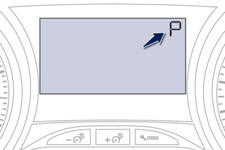
When you move the lever in the gate to select a position, the corresponding indicator is displayed in the instrument panel.
P. Park
R. Reverse
N. Neutral
D. Drive (Automatic driving)
S. Sport programme
. Snow programme
1 2 3 4. Gears engaged during manual operation
-. Invalid value during manual operation
Foot on brake
 Press the brake pedal
when this indicator lamp is displayed in the instrument panel (e.g.: starting the
engine).
Press the brake pedal
when this indicator lamp is displayed in the instrument panel (e.g.: starting the
engine).
See also:
Operation
Going into engine STOP mode
The "ECO" warning lamp
comes on in the instrument panel and the engine goes into standby:
- with a manual gearbox , at speeds below 12 mph (20 km/h), when yo ...
Quality of the fuel used for petrol engines
The petrol engines are perfectly compatible with E10 or E24 type petrol biofuels
(containing 10 % or 24 % ethanol), conforming to European standards EN 228 and EN
15376. E85 type fuels (containing ...
Automatic adjustment of the xenon headlamps
In order to avoid causing a nuisance to other road users, this system corrects
the height of the xenon headlamps beam automatically and when stationary, in relation
to the load in the vehicle.
...