



Rear view mirror
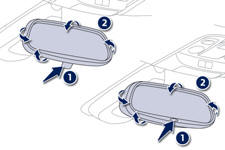
Manual day/night type
1. Selecting the "day" position of the rear view mirror.
2. Rear view mirror adjustment.
Automatic day/night type
1. Automatic detection of day/night mode.
2. Rear view mirror adjustment.
See also:
Indicator and warning lamps
Visual indicators informing the driver that a system is in operation (operation
or deactivation indicator lamps) or of the occurrence of a fault (warning lamp).
When the ignition is switched on
Ce ...
Trip computer with touch screen
System which provides current information concerning the trip (range, fuel consumption…). ...
Hazard warning lamps
A visual warning by means of the direction indicators to alert other road users
to a vehicle breakdown, towing or accident.
Press this button, the direction indicators fl ash.
They can operate w ...