



Wipers
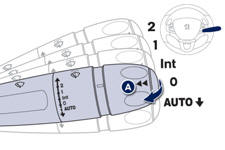
Control stalk A: windscreen wipers
2. Fast wipe.
1. Normal wipe.
Int. Intermittent wipe.
0. Park.
AUTO Automatic wiping.
 Single wipe: Brief pull on the stalk
towards. Screenwash: Long pull on stalk towards you.
Single wipe: Brief pull on the stalk
towards. Screenwash: Long pull on stalk towards you.
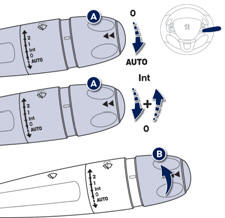
Switching on "AUTO" mode
 Briefly push the stalk downwards.
Switching off "AUTO" mode
 Briefly push the stalk downwards
or place the stalk in another position: Int, 1 or 2.
Briefly push the stalk downwards
or place the stalk in another position: Int, 1 or 2.
Ring B: rear wiper
See also:
Quality of the fuel used for Diesel engines
The Diesel engines are perfectly compatible with biofuels which conform to current
and future European standards (Diesel fuel which complies with standard EN 590 mixed
with a biofuel which complie ...
Mats
Removable carpet protection. ...
Door mirrors
Adjustment
A. Selection of the mirror.
B. Adjusting the position of the mirror glass.
C. De-selection of the mirror.
Other functions...
Folding / Unfolding. ...