



Trip reset
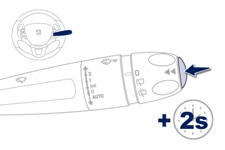
When the trip required is displayed, press the control for more than two seconds or use the left hand thumb wheel of the steering mounted controls.
Trips "1" and "2" are independent but their use is identical.
For example, trip "1" can be used for daily figures, and trip "2" for monthly figures.
See also:
Overview
Right from the start of the project, the technical choices structuring the
"A9" project (internal code name of the Peugeot 208) were directed on the basis
of the PSA Group's platform 1 t ...
Monochrome screen a (without audio equipment)
Displays on the screen
This displays the following information:
- time,
- date,
- ambient temperature * (this fl ashes if there is a risk of ice),
- status of the openings (doors, boot, ...),
...
Charging the battery using a battery charger
Disconnect the battery from the vehicle.
Follow the instructions for use provided by the manufacturer of the charger.
Connect the battery starting with the negative terminal (-).
Check that t ...