



Instrument panel navigator associated with the Peugeot Connect Media
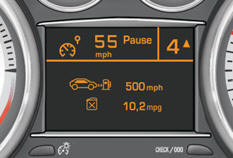
This group of buttons permits:
- when stationary , configuration of the vehicle's equipment and of the parameters of the central screen (languages, units...), - while driving , scrolling of the active functions (trip computer, navigation...).
Controls
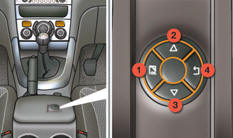
There are four buttons to control the large central instrument panel screen:
1. access the main menu, confirm the selection,
2. move up through the menu,
3. move down through the menu,
4. return to the previous screen, exit from the menu.
 The main menu and its associated
functions can only be accessed when stationary, via buttons 1 to 4 .
The main menu and its associated
functions can only be accessed when stationary, via buttons 1 to 4 .
A message appears on the central screen above a certain speed threshold, indicating that the main menu cannot be displayed.
The trip computer displays can only be accessed while driving, via buttons 2 and 3 (refer to the "Trip computer" section).
Main menu
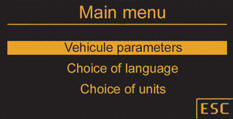
Press button 1 for access to the main menu and select one of the following functions:
- "Vehicle parameters",
- "Choice of language",
- "Choice of units".
Press button 2 or 3 to move on the screen.
Press button 1 again to confirm the selection.
Vehicle parameters
This menu allows you to activate or deactivate certain driving and comfort equipment:
- wiper linked with reverse gear (refer to the "Visibility" section),
- guide-me-home and welcome lighting (refer to the "Visibility" section),
- interior mood lighting (refer to the "Visibility" section),
- daytime running lamps (refer to the "Visibility" section),
- directional headlamps (refer to the "Visibility" section),
- rear parking sensors (refer to the "Driving" section).
Choice of language
This menu allows you to select the language used by the display: Deutsch, English, Espanol, Français, Italiano, Nederlands, Portugues, Türkçe *.
Choice of units
This menu allows you to select the units:
temperature (°Celsius or °Fahrenheit) and consumption (l/100 km, mpg or km/l).
* According to country.
See also:
The peugeot 3008, a crossover you can feel safe in
The Peugeot 3008 is designed to offer maximum safety in every respect:
primary safety is guaranteed by the high levels of road holding,
secondary safety is based on a particularly optimised structu ...
Moving off
Select position N.
Press the brake pedal down fully.
Start the engine.
N appears in the instrument panel
screen.
N flashes in the instrument panel, accompanied by an audible signal and a ...
Rear seats
Bench seat with fixed one-piece cushion and split backrest (left hand 2/3, right
hand 1/3) which can be folded individually to adapt the load space in the boot. ...