



USB port / Jack auxiliary socket
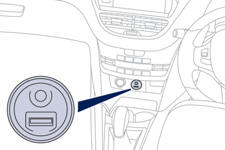
This connection box, consisting of a JACK auxiliary socket and a USB port, is located on the centre console.
It allows the connection of portable device, such as a digital audio player of the iPod ® type or a USB memory stick.
It reads the audio file formats (MP3, OGG, WMA, WAV, ...) which are transmitted to your audio system and played via the vehicle's speakers.
You can manage these files using the steering mounted controls or the audio system control panel and display them in the instrument panel screen.
When the USB port is used, the portable device charges automatically.
For more information on the use of this system, refer to the "Audio and Telematics" section.
See also:
Well-designed acoustics
This ambiance is also particularly well designed in terms of acoustics and
vibration comfort. Following the example of the work carried out on the 508, by
tracking the noise to the source (acousti ...
Identification markings
Various visible markings for the identifi - cation and tracing of your vehicle.
A. Vehicle identification Number (VIN) under the bonnet.
This number is engraved on the bodywork near the damper suppo ...
Repair procedure
1. Sealing
Switch off the ignition.
Turn the selector A to the "sealant" position.
Check that the switch B is in position "O".
Avoid removing any foreign bodies whic ...