



Selection
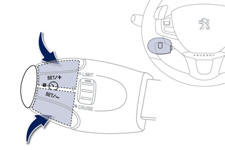
To select a memorised speed:
- press and hold button " + " or "- "; the system stops at the closest memorised speed,
- press and hold button " + " or "- " again to select another memorised speed.
A reminder of the speed and the state of the system (on / off) is displayed in the instrument panel.
See also:
Boot
Opening
After unlocking the vehicle using the remote control or the key, press the handle
A and lift the tailgate.
Closing
After closing the lower tailgate, pull the handle B downwards to gui ...
A new stage in eco-design
Eco-design is another area in which the Peugeot 208 had to prove itself a
pioneer. With the integration of 25% "green materials" out of the 170 kg of
polymers (excluding rubber) present ...
Automatic gearbox
Four-speed automatic gearbox which offers a choice between the comfort of fully
automatic operation, enhanced by sport and snow programmes, or manual gear changing.
There are therefore four driving ...